Full storage?
Deletethe junk.
Keepthe memories.
Odoa clears your camera roll one swipe at a time. Left to delete, right to keep. Reclaim gigabytes in minutes, and every photo stays on your iPhone.
- 100% on-device. Your photos never leave your phone.
- No ads. Nothing interrupts your cleanup.
- Finds duplicates. Similar shots grouped for you.
- Undo anything. A trash review before it's gone.

Or scan to install
A photo cleaner that actually frees up space
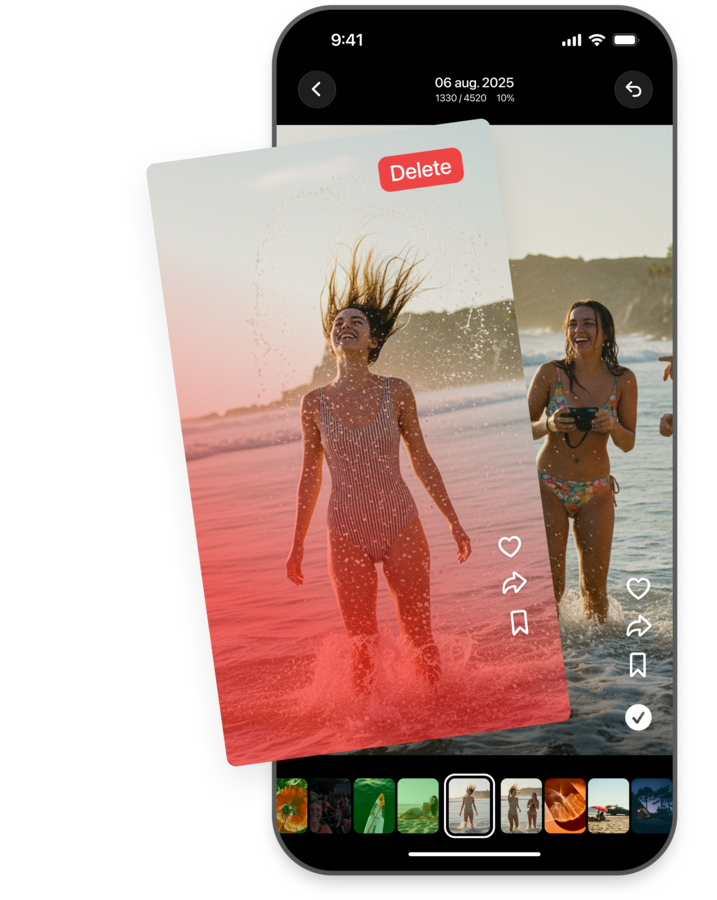
Odoa is a photo cleaner app for iPhone that turns a bloated camera roll into quick, focused sessions. Instead of scrolling through thousands of photos, you swipe through smart batches: duplicate and similar shots grouped automatically, screenshots and videos filtered in one tap, your biggest space-wasters sorted first. Swipe left to delete, right to keep, and watch gigabytes come back.
Prefer the manual route? Our step-by-step guides cover the built-in ways to clean up an iPhone, with or without an app.
Popular guides
Your library, organized without thinking about it
Odoa doesn't just show you photos in a long list. It breaks your camera roll into pieces that are actually easy to clear.
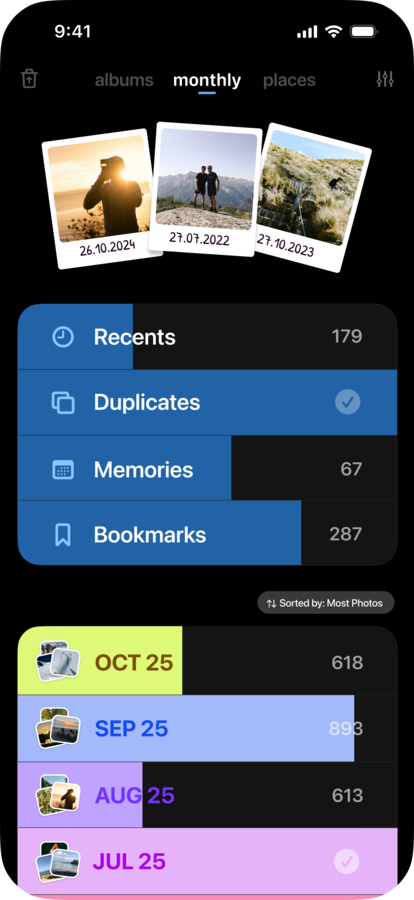
Month by month
Every month gets its own progress bar, so a huge library turns into a series of small, finishable sessions.
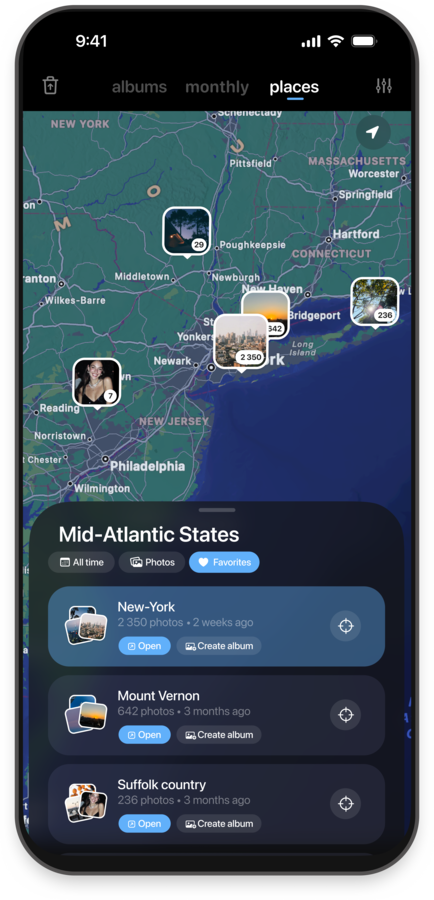
Places
Photos cluster on a map by where they were taken, so you can clear a whole trip in one pass.
Memories
A "This Day" view resurfaces photos from the same date in past years while you clean.
Duplicates & similar shots
Burst shots and near-identical photos are grouped automatically, with the best one suggested for you.
Filters
Jump straight to screenshots, videos, or selfies instead of scrolling past everything else.
Sort by size
See your biggest space-wasters first. A few large videos often outweigh hundreds of photos.
How it works
Swipe
Right to keep, left to delete. One decision per photo, full-screen, no menus.
Review
Everything you delete waits in an in-app Trash first, so nothing disappears without a second look.
Reclaim
Confirm, and see exactly what you got back, down to the megabyte.
Your photos never leave your phone
No account. No cloud sync. No upload, even for duplicate detection, which runs entirely on your device. We built Odoa this way on purpose. Your camera roll is one of the most personal things you own, and the safest place for it is the one place it already is.
More on how Odoa handles your photos →No account required
No cloud sync
No ads, ever
On-device duplicate detection
Wondering how Odoa stacks up?
We wrote an honest comparison against the best-known swipe-based cleaner: privacy, ads, and speed, side by side.
Read Odoa vs Swipewipe →Frequently asked questions
Does Odoa upload my photos anywhere?
No. Odoa is 100% on-device. Your photos never leave your iPhone: there's no account, no cloud sync, and nothing sent to a server. Even duplicate detection runs locally on your phone.
Does Odoa delete photos permanently?
No. Photos you swipe to delete go to an in-app Trash first, where you can review, keep, or confirm. Only when you confirm are they removed, and they then land in your iPhone's Recently Deleted album for 30 days. You can also undo, step by step.
Does Odoa find duplicate photos?
Yes. Odoa detects both exact duplicates and visually similar photos, like burst shots, on-device. It automatically suggests which one to keep and shows how much storage you'll recover.
Is Odoa free?
You can start cleaning your current and recent months, plus Bookmarks, for free. A subscription unlocks the rest of your library: screenshots, albums, videos, selfies, This Day, duplicates, Places, and sorting.
Does Odoa show ads?
No. Odoa has no ads at all, on the free tier or the paid one.
What happens to photos after I delete them?
They move to your iPhone's Recently Deleted album for up to 30 days before being permanently erased, giving you a safety net if you change your mind.
Is Odoa safe to use with my photos?
Yes. Odoa runs entirely on your iPhone, with no account, no cloud upload and no ads. Everything you swipe to delete passes through an in-app Trash you review first, and iOS keeps deleted photos in Recently Deleted for another 30 days.
What is the best photo cleaner app for iPhone?
It depends on what you value most. If privacy is your priority, pick a cleaner that works fully on-device, like Odoa, which means no uploads and no ads. We compared the best photo cleaner apps for iPhone in an honest, hands-on guide.
Will cleaning my camera roll free up iCloud storage?
If you use iCloud Photos, yes: photos you delete are removed from iCloud too (after 30 days in Recently Deleted). Your iPhone's local storage is reclaimed once Recently Deleted is emptied. See our guide on iCloud storage full vs iPhone storage full.

Your camera roll, cleaned in minutes
Swipe left to delete, right to keep. Free to start, no ads, and every photo stays on your iPhone.
- 100% on-device
- No ads
- Finds duplicates
Free on the App Store